
One Voice, Every App
The way you want dictation written depends on where it lands. A commit message, a Slack reply and a client email shouldn’t all come out the same. The Writing Styles page in Settings lets you pick a style for each app you use.
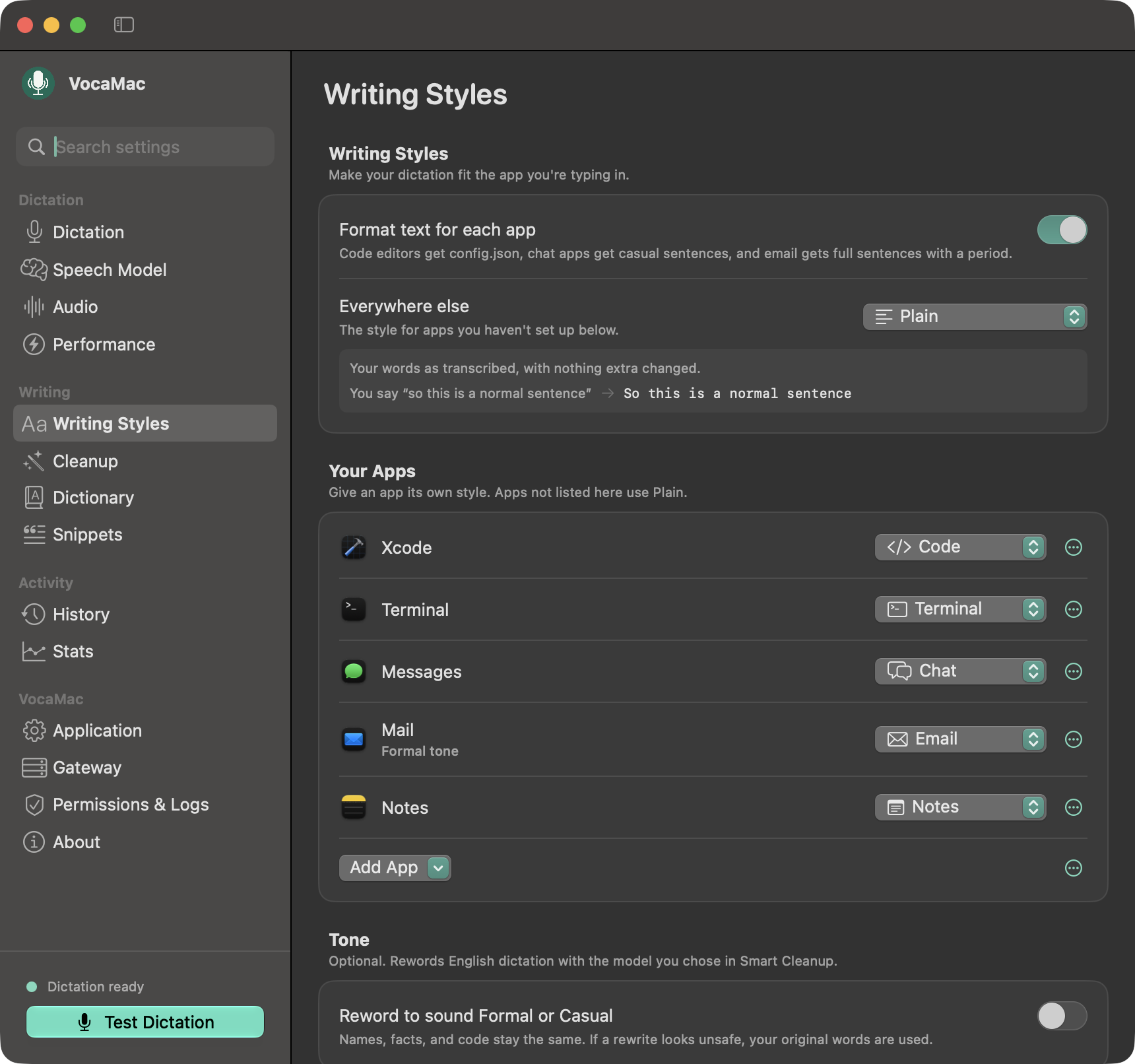
Pick a Style Per App
- Everywhere else — the style for any app you haven’t set up. Plain leaves your words as transcribed.
- Your Apps — give an app its own style: Plain, Code, Terminal, Chat, Slack, Email, or Notes.
- Tone (optional) — reword English dictation as Formal or Casual with the cleanup model you chose. It’s off by default.
Code editors get config.json, chat apps get casual sentences, and email gets full sentences with a period. Format text for each app switches all of this on or off.
Code and Terminal Keep Your Words
In Code and Terminal, a model is never allowed to reword what you said. It can only point out filler, which VocaMac then removes from your own words. Identifiers, paths and commands come out the way you spoke them.
Stays on Your Mac
Styles are applied on your Mac. Rewording with Tone uses the cleanup provider you selected, which is a local model unless you opted into an endpoint.
Ready to try Writing Styles?
Install VocaMac