Speech Is Messier Than Writing
Say a sentence out loud and read the transcript back. It is all there — the “um”, the “I was, I was going to say”, the sentence that restarts halfway through. Speech recognition is doing its job faithfully; the problem is that nobody writes the way they talk.
Transcript Cleanup runs a small language model over the finished transcript, on your Mac, before the text is typed. Filler words go, false starts go, and what you said gets punctuated.
What It Actually Does
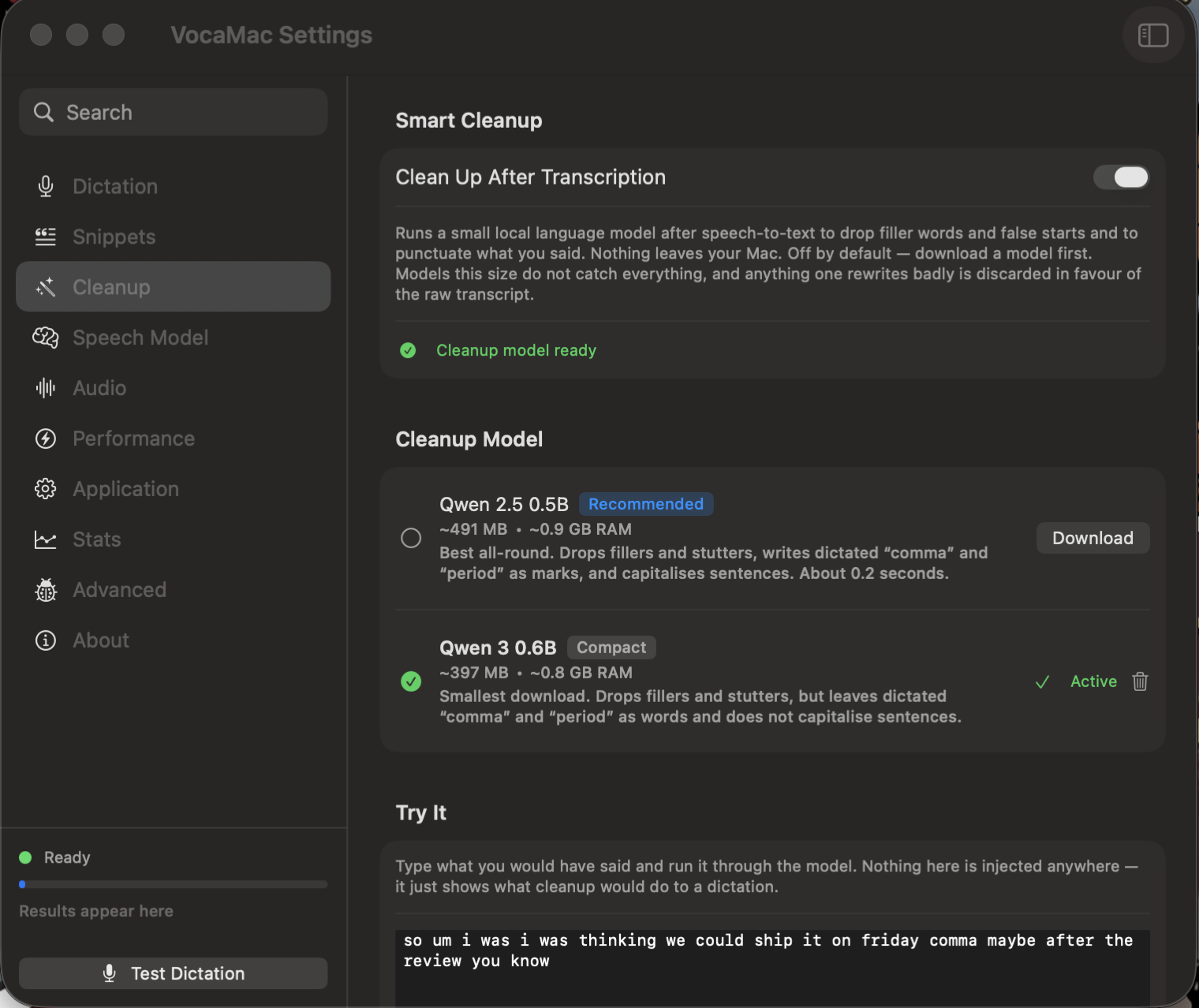
so um i was i was thinking we could ship it on friday comma maybe after the review you know

  ↓

So I was thinking we could ship it on Friday, maybe after the review.
Filler words removed, the repeated “I was” collapsed, the spoken “comma” written as a comma, and the sentence capitalised.
It is deliberately narrow. It does not summarise, rephrase, or answer — if you dictate a question, you get your question back, punctuated, not an answer to it. Anything the model returns that looks like a summary, a refusal, or a chatbot reply is discarded and your original transcript is used instead. The worst case is that nothing changes.
Off by Default
Cleanup is opt-in and requires a one-time model download. Open Settings → Cleanup, download a model, and turn it on.
| Model | Size | Notes |
|---|---|---|
| Qwen 2.5 0.5B | ~491 MB | Recommended. Writes dictated “comma” and “period” as marks and capitalises sentences. |
| Qwen 3 0.6B | ~397 MB | Smallest. Punctuates long paragraphs slightly better; leaves dictated punctuation as words. |
Both add roughly two tenths of a second to a short dictation. If the model takes too long, returns nothing, or returns something implausible, VocaMac falls back to the raw transcript rather than making you wait.
Try It Before You Trust It
The Cleanup settings page has a Try It box. Type what you would have said, run it through the model, and see exactly what dictation would have produced. It tells you which of four things happened — the text was cleaned, the model returned it unchanged, the rewrite was discarded (and why), or cleanup was skipped (and why) — so a model that is quietly doing nothing is visible rather than mysterious.
You can edit the prompt the model is given and try the edit immediately, before saving it.
Honest Limits
These are very small models, chosen so cleanup finishes fast enough to sit in the middle of a dictation. They will not catch every filler, and neither of the shipped models reliably acts on a spoken “scratch that” — the prompt asks for it, but do not rely on it. Dictation in languages other than English is passed through untouched rather than mangled.
Private by Design
The model runs on your Mac through llama.cpp with Metal acceleration. Your transcript is never sent anywhere — cleanup is the same on-device promise as the rest of VocaMac, and turning it off unloads the model and frees the memory.
Ready to try Transcript Cleanup?
Install VocaMac