← Back to Home
🧠

Smart Model Selection

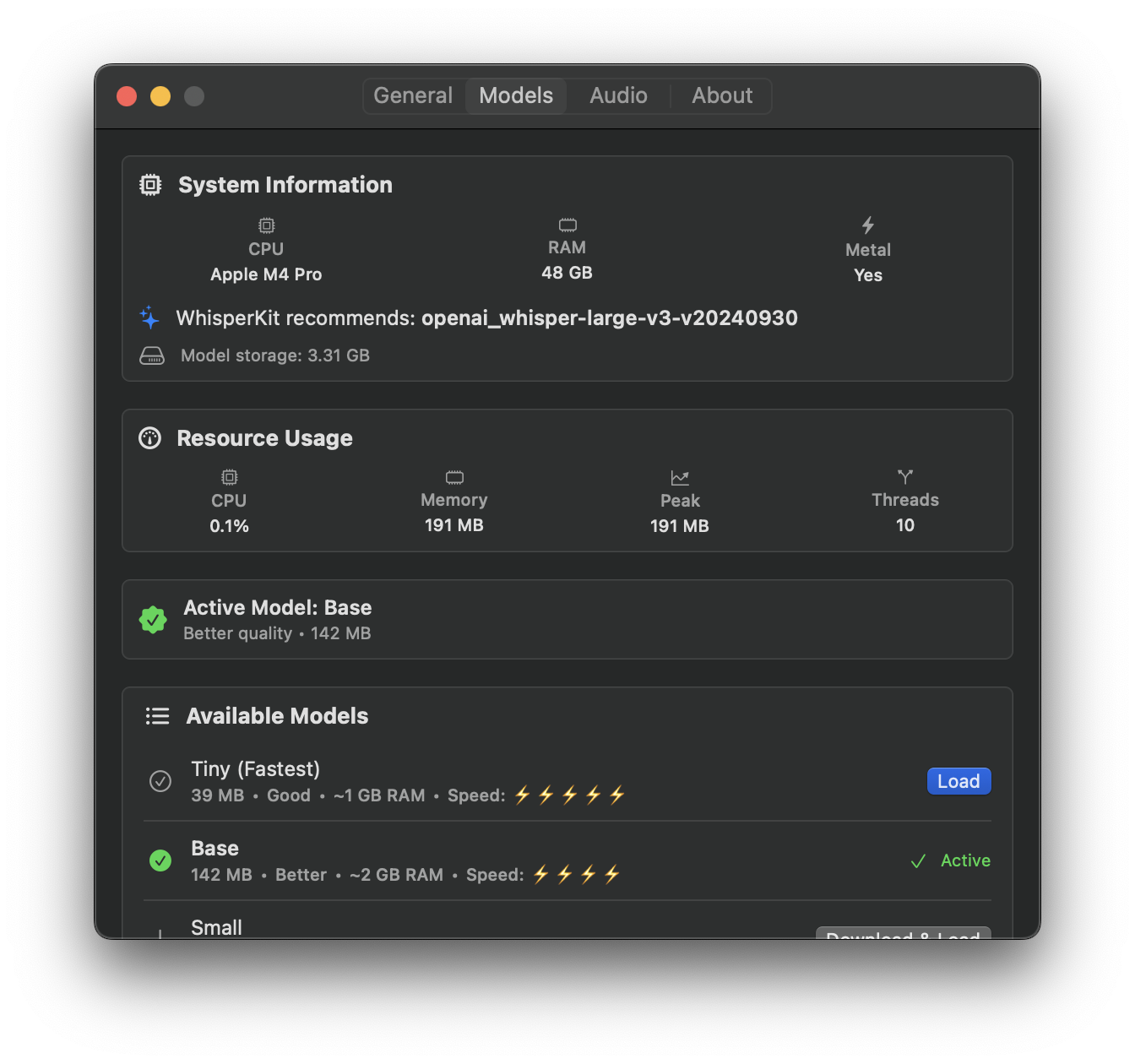
Auto-detects your hardware (Apple Silicon, Intel, RAM) and recommends the optimal Whisper model.

Intelligent Hardware Detection

Every Mac is different. A MacBook Air with Apple Silicon has different capabilities than an Intel Mac mini with 8GB RAM. VocaMac detects your exact hardware configuration and recommends the Whisper model that delivers the best balance of accuracy and speed on your specific machine.

On first launch, VocaMac analyzes your processor type (Apple Silicon or Intel), CPU core count, GPU availability, and installed RAM. It then suggests the optimal model tier. You remain free to choose any model, but the recommendation gets you great results immediately without guesswork.

Five Model Tiers

VocaMac Settings showing model management and system info

VocaMac supports five Whisper model sizes, from lightweight to highly accurate. Each model is optimized for CoreML and runs entirely on your Mac.

Tiny (39 MB) The fastest option with minimal memory overhead. Suitable for Macs with 4-8GB RAM or when you prioritize speed over perfect accuracy. Transcription completes in real-time or faster. Accuracy drops slightly compared to larger models, but remains acceptable for casual note-taking and quick messages.

Base (140 MB) A solid middle ground. Runs efficiently on any Mac with 8GB RAM or more. Offers noticeably better accuracy than Tiny while maintaining very fast transcription speeds. This is often the recommended model for most users.

Small (465 MB) For users with 16GB RAM seeking higher accuracy. Transcription speeds remain fast on modern Macs. Accuracy improves substantially. Recommended for professional writing, coding, and applications where precision matters.

Medium (1.5 GB) High accuracy for demanding use cases. Requires 16GB RAM or more. Transcription remains reasonably fast on Apple Silicon Macs. Excellent for technical documentation, medical transcription, and content creation where every word counts.

Large v3 (3 GB) The most accurate model available. Peak performance on Apple Silicon Macs with 32GB or more RAM. Transcription speed may reach 2-3 seconds per minute of audio. Use when maximum accuracy is essential and speed is secondary.

Hardware-Based Recommendations

VocaMac provides tailored suggestions:

  • MacBook Air with Apple Silicon (8GB): Base or Small model recommended
  • MacBook Pro with Apple Silicon (16GB): Small or Medium model recommended
  • Mac mini with Intel (8GB RAM): Tiny or Base model recommended
  • Mac Studio with Apple Silicon (32GB): Medium or Large v3 model recommended

These recommendations balance your hardware capabilities with practical transcription speeds. Your actual choice depends on your accuracy requirements and tolerance for processing time.

Downloading and Switching Models

Models download on-demand. First use of a model triggers a download (requires internet connection). Subsequent launches use the cached model. Each model includes a checksum verification to ensure integrity.

Switch models instantly in VocaMac settings. No restart required. Your next recording uses the newly selected model. You can maintain multiple models on disk and switch between them based on context. Recording a technical meeting? Switch to Small. Quick email dictation? Use Tiny.

Model storage uses your local disk space. VocaMac shows disk usage for each model. Delete unused models to reclaim space.

CoreML Optimization

All Whisper models in VocaMac are converted to Apple’s CoreML format. This optimization ensures:

  • Native execution on Apple Silicon using Neural Engine
  • Efficient Intel compatibility through Intel AMX (Apple Mac compatible) instructions
  • Minimal energy consumption (important for battery life on laptops)
  • No cloud dependencies or external API calls
  • Complete privacy (all processing happens locally)

CoreML models leverage your Mac’s specialized ML hardware. Apple Silicon Macs see dramatic speed improvements compared to generic ML frameworks. You get the best possible performance from your hardware.

Choose Your Balance

VocaMac trusts you to make the final choice. The automatic recommendation helps you start immediately, but you control which model runs on your Mac. Prioritize speed on some machines. Prioritize accuracy on others. Change your preference whenever your needs evolve.

Your dictation workflow adapts to your hardware and preferences. That is the VocaMac approach.

Ready to try Smart Model Selection?

Install VocaMac - It's Free