Silence Detection
Auto-stops recording after you stop speaking. Adjustable sensitivity and duration thresholds.
How It Works
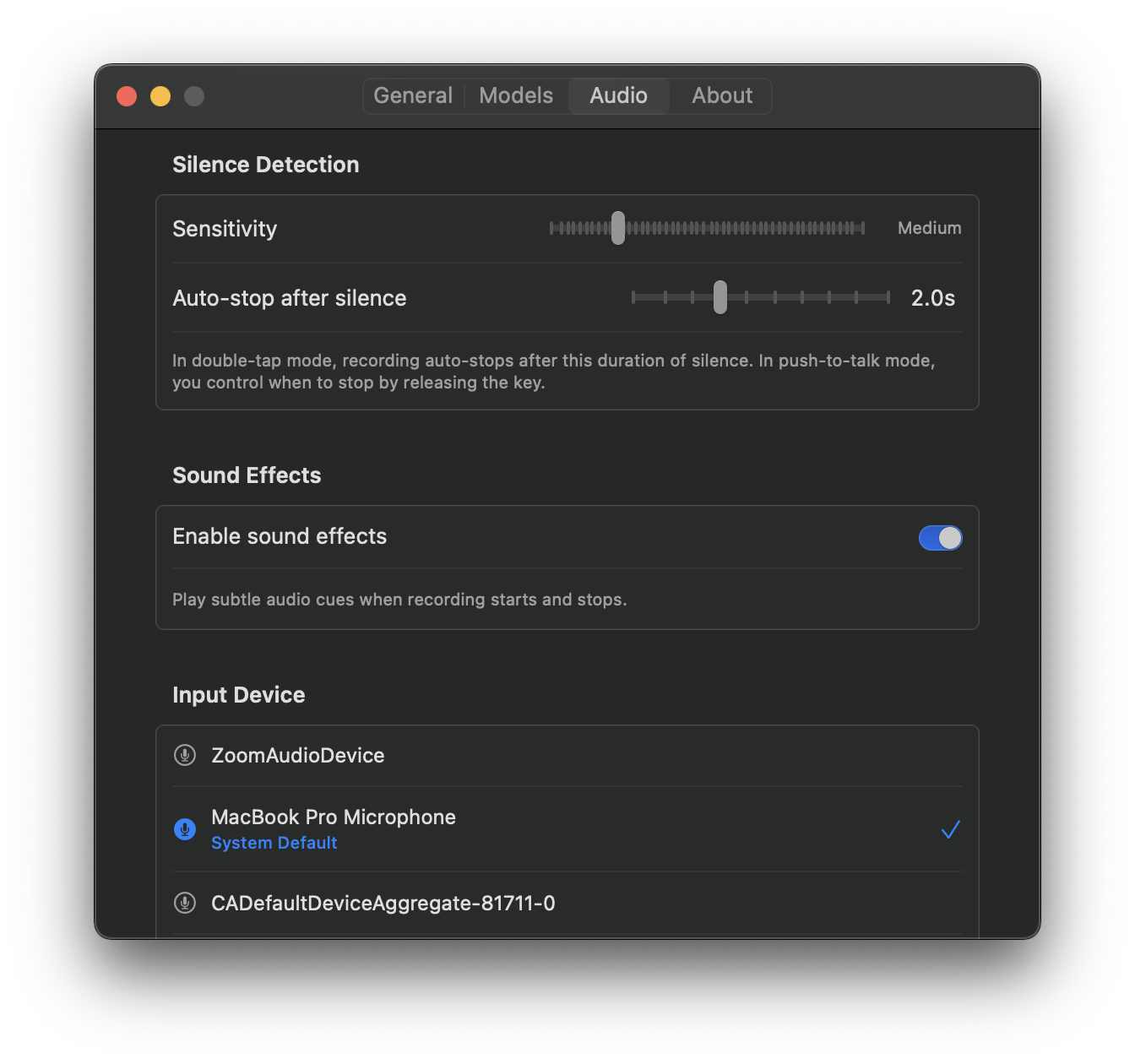
Silence detection is VocaMac’s intelligent feature that automatically stops recording when it detects you’ve finished speaking. You don’t have to manually stop. Just speak, and when you pause, the app listens to the ambient sound in your environment and decides when recording should end.
Under the hood, silence detection works by measuring the root mean square (RMS) energy of incoming audio. RMS energy is a standard measure of audio loudness. VocaMac continuously calculates this value and compares it against a threshold you set. When the audio level drops below that threshold for a configurable duration, recording stops automatically.
This is particularly useful in two scenarios:
- Double-Tap Toggle mode: you can start recording with one double-tap, speak freely, and let VocaMac stop automatically when you pause
- Hands-free dictation: ideal for longer transcriptions where holding a key becomes tiring
Configurable Sensitivity
Every environment is different. A quiet home office has lower background noise than a busy coffee shop. VocaMac lets you tune silence detection to match your surroundings with two settings:
Silence Threshold (0-100%)
This controls how sensitive the detector is to quiet sounds. A lower threshold is more aggressive (stops recording sooner), while a higher threshold is more lenient (requires more silence before stopping).
- Low threshold (20-40%): use in quiet environments where you want quick stops
- Medium threshold (50-60%): the default sweet spot for most users
- High threshold (70-90%): use in noisy environments to prevent accidental cutoffs
Silence Duration (0.5-3 seconds)
This is how long VocaMac waits after detecting silence before actually stopping the recording. A longer duration gives you time to catch your breath between sentences without the recording cutting off unexpectedly.
- 0.5 seconds: aggressive, stops almost immediately after silence
- 1-1.5 seconds: the default, balances responsiveness with safety
- 2-3 seconds: forgiving, great for natural pauses in speech
You can adjust both settings in Settings → Audio → Silence Detection.
Silence Detection with Push-to-Talk vs. Double-Tap Toggle
The two activation modes interact with silence detection differently:
Push-to-Talk Mode
In Push-to-Talk, you’re holding a key down. Silence detection is disabled here because it’s redundant: releasing the key stops recording instantly. When you need silence detection, switch to Double-Tap Toggle.
Double-Tap Toggle Mode
This is where silence detection shines. You double-tap to start recording, and VocaMac monitors silence in the background. When you finish speaking and pause, the silence detector kicks in and stops recording automatically. You never have to double-tap again.
This means you can speak naturally, take breaths between sentences, and let VocaMac handle the timing. It feels effortless.
Preventing Accidental Cutoffs
One concern with any silence detection system is false positives: stopping recording too early because of a brief pause or background noise. VocaMac protects against this with several strategies:
Tunable thresholds: adjust sensitivity and duration to match your environment
Minimum recording duration: VocaMac won’t stop recording in the first 0.3 seconds, even if silence is detected, to avoid cutting off initial words
Adaptive thresholds: the silence detector continuously adapts to the ambient noise floor in your environment, so sudden sounds (a door closing, a car horn) won’t trigger a false stop
Real-time monitoring: you can see the audio level indicator in the VocaMac popover in real time, so you know exactly how loud the detector thinks your speech is
Recent Bug Fix
VocaMac recently fixed a critical silence detection bug: in rare cases, audio at the very beginning of a recording could be lost if the silence detector kicked in too aggressively during the initial setup phase. This has been corrected.
Now, VocaMac guarantees that:
- No audio is lost at the start of recording
- The minimum recording duration (0.3 seconds) is respected
- The silence threshold always accounts for the detected noise floor
This means you can trust silence detection completely. Your words won’t be cut off, and nothing will be lost.
Tips for Best Results
- In quiet environments, use a lower sensitivity threshold (40-50%)
- In noisy environments, use a higher threshold (70-80%) to avoid false stops
- Start with the default 1-second duration and adjust based on your natural speech patterns
- Use silence detection primarily in Double-Tap Toggle mode
- Test your settings in a quick voice memo to hear how they feel before relying on them during real work
Ready to try Silence Detection?
Install VocaMac - It's Free